

A Reality Check
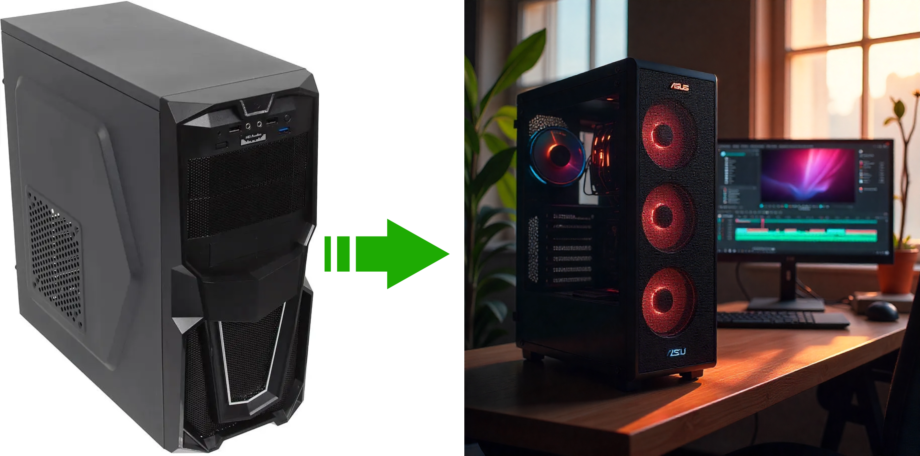
So, you’re staring at your trusty old computer, a faithful companion since the mid-2010s. It’s served you well, but now you have bigger ambitions: you want to dive into modern, high-refresh-rate gaming and tackle demanding 4K video editing with professional software like DaVinci Resolve 20. Your system, built around a classic motherboard like the ASUS B85M-G R2.0, is at a crossroads. Can you breathe new life into it with a few strategic upgrades, or is it time for a complete overhaul?
This is a question many PC owners face. On one hand, a targeted upgrade seems like a cost-effective way to boost performance. On the other, are you just pouring money into a sinking ship?
In this deep dive, we’ll analyze a system with a 2015-era ASUS B85M-G R2.0 motherboard and explore two distinct paths forward. We’ll look at a “max-out” budget upgrade versus a full modern rebuild. While the cheap path is tempting, we’ll uncover the hidden bottlenecks, software risks, and performance ceilings that make a full platform replacement the only logical choice for a truly future-proof and powerful creative workstation.
While we recommend this apps, platforms and product, I want to make it clear that we are not sponsored by any of the service providers and this information is sorely for educational purposes.
Joe Tiza
The Heart of the Problem: Your 2015-Era Motherboard
Before you buy a single new component, you have to understand the foundation of your PC: the motherboard. It dictates the technological limits for everything else. In this case, the ASUS B85M-G R2.0, while a solid board for its time, is now a decade-old piece of architecture that creates a hard ceiling on performance.
A Look Under the Hood: Core Limitations
The ASUS B85M-G R2.0 is based on the Intel B85 chipset, designed for Intel’s 4th Generation “Haswell” processors (LGA 1150 socket). This 2014 architecture imposes several critical limitations in 2025:
The board supports a maximum of 32 GB of DDR3 RAM, topping out at a speed of 1600 MHz. Modern systems use DDR5, which offers more than double the bandwidth. For memory-intensive work like video editing in DaVinci Resolve, this is a major bottleneck that leads to slow rendering and a sluggish timeline.
You get a single PCI Express 3.0 x16 slot for your graphics card. Today’s GPUs are designed for PCIe 4.0 or even 5.0. While a new card will work in the older slot, its potential bandwidth is cut in half. This might be a minor issue for some games, but for data-heavy GPU tasks in Resolve, it can hinder performance.
Perhaps the most crippling limitation for a video editor is the complete lack of native M.2 support for modern NVMe SSDs. The fastest storage connection on this board is SATA III, with a real-world speed of about 550 MB/s. A modern PCIe 4.0 NVMe SSD can hit speeds over 7,000 MB/s—that’s more than 12 times faster. This massive speed difference impacts everything from opening projects and importing media to render cache performance, making your entire workflow feel slow and clunky.
The Windows 11 Tightrope Walk
Your system is running Windows 11 Pro, but this is a precarious situation. The 4th Gen Intel platform does not officially meet Microsoft’s requirements for Windows 11, which demand an 8th Gen CPU or newer, TPM 2.0, and Secure Boot.
This means your OS was installed using a bypass method. While it works now, you’re living on borrowed time. Microsoft is increasingly enforcing hardware checks with its updates. A recent update required a CPU instruction called POPCNT, which Haswell CPUs fortunately have. But there’s no guarantee a future update won’t introduce a new check that your old platform fails. This could disable features, block security updates, or even prevent your system from booting. Investing hundreds of dollars into a platform that a routine software update could cripple is a massive financial risk.
Path A: The “Max-Out” Upgrade (~$420)
This path focuses on squeezing every last drop of performance from the old ASUS B85M-G R2.0 motherboard by finding the best compatible parts on the used market. It’s the cheapest route, but one that’s full of compromises.
The Best CPU of a Bygone Era: Intel Core i7-4790K
The most significant CPU upgrade for this motherboard is the Intel Core i7-4790K. In 2014, this 4-core, 8-thread processor was a beast, with a turbo clock of 4.4 GHz. Today, its limited core count is a major handicap for modern video editing. You can find one on eBay for about $85.
Essential Supporting Upgrades
- RAM: DaVinci Resolve needs a lot of memory. You must upgrade to the board’s maximum of 32 GB. A used 32 GB (4x8GB) kit of DDR3-1600 RAM costs around $40 and is a necessary investment.
- Storage: To make the system feel responsive, you need a Solid-State Drive (SSD). Since there’s no M.2 slot, your only option is a 2.5-inch SATA SSD. A new 1 TB SATA SSD for your OS and applications will cost about $65.
The GPU Conundrum: Gaming vs. Editing
Choosing a graphics card is where things get tricky. Your goals of gaming and video editing are in direct conflict on this old hardware.
For gaming, a powerful modern GPU will be severely bottlenecked by the 4-core i7-4790K. The GPU will spend a lot of time waiting for the CPU, resulting in lower frame rates than the card is capable of. A mid-range card like an RTX 2060 would be a “balanced” choice for gaming alone.
However, DaVinci Resolve has a non-negotiable demand: VRAM (Video RAM). If your project’s complexity exceeds the GPU’s VRAM, Resolve won’t just slow down—it will crash with a “GPU memory is full” error. This is a hard failure. For 4K editing, 8 GB of VRAM is cutting it close, while 12 GB or more provides a much-needed safety net.
A gaming bottleneck is annoying, but a VRAM crash in Resolve makes work impossible. Therefore, we must prioritize VRAM.
The best choice here is the NVIDIA GeForce RTX 3060 12GB. Its 12 GB of VRAM is crucial for stability in DaVinci Resolve. Resolve is also heavily optimized for NVIDIA’s CUDA technology, which accelerates many key features. Yes, this GPU will be bottlenecked by the i7-4790K in many games, but it ensures your video editing workflow is stable. You can find a used one for around $230.
Crucial Final Check
Before buying, open your PC case and check your Power Supply Unit (PSU). The RTX 3060 requires at least a 550W PSU and usually one 8-pin PCIe power connector. Make sure your PSU can handle it.
Path A: Cost Summary
| Component | Recommended Model | Rationale | Estimated Used Price (2025) |
| CPU | Intel Core i7-4790K | The most powerful compatible CPU for the LGA 1150 socket. | $85 |
| RAM | 32GB (4x8GB) DDR3-1600 | 10.7mm | $85 |
| GPU | NVIDIA GeForce RTX 3060 12GB | Maximum supported capacity, essential for DaVinci Resolve stability. | $230 |
| Storage | 1TB 2.5″ SATA SSD | Best balance of VRAM for Resolve stability and CUDA performance. | $65 |
| Total Estimated Cost | $420 |
Path B: The Modern Platform Leap ($1,205)
This path involves a complete rebuild of your core system: a new CPU, motherboard, and RAM. It’s more expensive, but it’s the only way to build a truly high-performance, stable, and future-proof machine for your goals.
More Than Parts – The Power of a Modern Ecosystem
Path A is like putting a V8 engine in a car with bicycle tires. The power is there, but the underlying infrastructure can’t deliver it. A modern platform upgrades the entire data highway. A multi-core CPU, high-speed DDR5 RAM, a PCIe 4.0 bus, and an NVMe M.2 SSD all work together in harmony. The result isn’t just an additive performance boost; it’s multiplicative. The entire experience is faster and more responsive in a way a piecemeal upgrade can never be.
“Sweet Spot” Build for 2025
Here is a sample build that hits the sweet spot for price-to-performance for a dual-purpose gaming and editing rig in 2025.
A modern performance champion. With 14 cores and 20 threads, it’s a productivity monster. It’s roughly
380% faster in multi-core tasks than the i7-4790K, which means dramatically faster video renders. Its fast performance cores also ensure high frame rates in games.
A B760 motherboard provides all the modern features you need, including DDR5 support, a PCIe 5.0 slot for the GPU, and multiple PCIe 4.0 M.2 slots for ultra-fast storage, all at a great price.
This is the current performance sweet spot. 32GB is perfect for 4K editing and gaming, and the high speed and low latency benefit both workloads.
Freed from the old CPU’s constraints, we can pick a GPU for maximum performance. The RX 7800 XT’s massive 16 GB of VRAM is a huge advantage for DaVinci Resolve, ensuring stability with even the most complex 4K projects. For gaming, it’s a 1440p and 4K powerhouse. While Resolve has historically favored NVIDIA, recent improvements have made AMD cards highly competitive, and the VRAM advantage here is undeniable.
This is what makes a modern PC feel fast. With speeds over 12 times faster than the SATA SSD in Path A, your OS will boot in seconds, and your 4K video timeline will be incredibly responsive.
A high-quality 850W PSU provides clean, stable power for this build with plenty of headroom for future upgrades.
Path B: Cost Summary
| Component | Recommended Model | Rationale | Estimated Used Price (2025) |
| CPU | Intel Core i7-4790K | Excellent balance of high core count for productivity and fast cores for gaming. | $200 |
| Motherboard | B760 DDR5 Motherboard | Modern feature set (PCIe 5.0, M.2) at a reasonable price point. | $150 |
| RAM | 32GB DDR5-6000 CL30 Kit | The performance “sweet spot” for modern gaming and content creation. | $85 |
| GPU | AMD Radeon RX 7800 XT 16GB | Massive 16GB VRAM for Resolve, excellent 1440p/4K gaming performance. | $500 |
| Storage | 2TB PCIe 4.0 NVMe SSD | Ultra-fast storage essential for a responsive editing and gaming experience. | $140 |
| PSU | 850W 80+ Gold PSU | Provides clean, stable power with headroom for future upgrades. | $120 |
| Total Estimated Cost | (Excludes case, CPU cooler, and OS) | $1,205 |
My Final Verdict: Upgrade or Rebuild?
Let’s put the two paths head-to-head. The numbers tell a clear story.
| Metric | Path A: Maxed-Out 2015 PC | Path A: Maxed-Out 2015 PC | The Winner Is… |
|---|---|---|---|
| Total Estimated Cost | $420 | $1,205 | Path A (Cost) |
| CPU Multi-Core Performance | 8,063 (PassMark) | 38,700 (PassMark) | Path B (+380%) |
| CPU Multi-Core Performance | 45-67 FPS (CPU Bottleneck) | 120+ FPS | Path B (+100%) |
| DaVinci Resolve Performance | Low: Slow renders, poor timeline scrubbing.High: Fast rend | High: Fast renders, smooth 4K timeline. | Path B (Transformative) |
| Storage Speed (Max) | 550 MB/s (SATA) | 7,000+ MB/s (NVMe) | Path B (+1170%) |
| Windows 11 Support Risk | High: Unsupported platform, future updates could break it. | None: Fully supported platform. | Path B |
While the $420 price tag of Path A is tempting, it’s a flawed investment. You’d be creating a deeply unbalanced machine where every new part is held back by the decade-old foundation. The editing experience would remain frustrating, and the entire system would live under the constant threat of being disabled by a software update. It is a path of high risk and deep compromise.
Path B, at around $1,205, is a true generational leap. It doesn’t just upgrade parts; it upgrades the entire technological ecosystem. The performance increase is transformative. For video editing, it’s the difference between fighting your computer and having it empower your creativity. For gaming, it unlocks the fluid, high-frame-rate experience you’re looking for.
Our definitive recommendation is to pursue Path B. Saving up for a complete system replacement is the most logical, valuable, and ultimately satisfying solution. Think of it not as a cost, but as a necessary investment in a professional-grade tool that will serve your gaming and creative ambitions for the next five to seven years. It’s the only path that truly delivers on your goals with performance, stability, and peace of mind.